

Blogs

Copy Opera Grid Forms to Excel
Hints & Tips for Opera 3
Welcome to our next Hints & Tips for Opera 3 to help you get the most from your software. We really hope you find this email both beneficial and helpful.
Please share with all your Opera users.

Copy Opera Grid Forms to Excel
…. when sat viewing any grid form, which could be an Accounts list or a list of Transactions, as below…

…simply Right mouse click one of the column headings, which will display a menu and select Copy Data.

Then, Open Excel, Ctrl+V to paste the grid’s contents and… voila!

Watch out for our next in the series.
– The Profile Team
Send Copy Sales Invoice & Autofill Current Year
Hints & Tips for Opera 3
Welcome to the first of many Hints & Tips for Opera 3 to help enhance you and your colleagues’ efficiency while using the software. We really hope you find this email both beneficial and helpful. Please feel free to share it with your relevant team members.

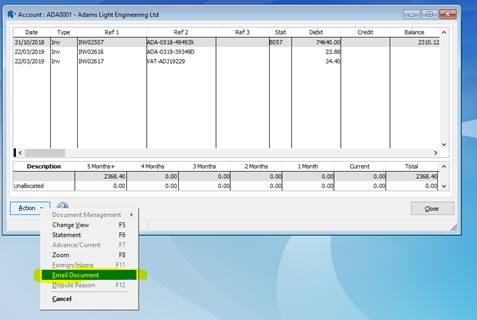
1. You can send a copy sales invoice with one simple click…
Go to the customer’s account view, highlight the desired invoice then right click, or select Action, and email document.


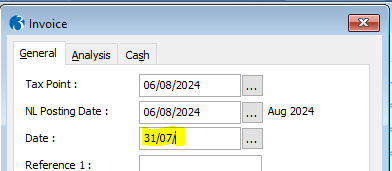
2. Opera autofill’s the current year for you…….
In a date field, enter the day and month as normal, but leave the year blank, as follows:

Then use the Tab [key] or click in the next field and the current year 2024 will be auto populated for you.

We hope this helps. Look out for more useful hints and tips coming soon.
– The Profile Team
Hints & Tips for Opera 3
Hints & Tips for Opera 3
Welcome to the first of many Hints & Tips for Opera 3 to help enhance you and your colleagues’ efficiency while using the software. We really hope you find this email both beneficial and helpful. Please feel free to share it with your relevant team members.

1. You can send a copy sales invoice with one simple click…



Summer Cleardown
Summer Cleardown Special: Optimise Your Opera 3 Data and Improve Efficiency!
With the summer season underway, it’s the perfect time to declutter and streamline your company data for enhanced efficiency and performance.
Introducing Our Summer Cleardown Service!

Let Profile Cleardown help you tidy up your live Opera company data by removing outdated accounts, transactions, stock items, and more—those that haven’t been used or looked at in years. Here’s how you can benefit:
- Improve Efficiency: By clearing out unused data, your systems will run faster and more efficiently, helping you focus on current and future operations without the drag of obsolete information.
- Enhanced Data Management: A clean database makes it easier to manage your current data, reducing the time and effort needed for everyday tasks.
- Archival Access: Don’t worry about losing important historical data. We will archive your company data securely in Opera 3 so you can easily access it whenever needed.
Contact us on sales@profile.co.uk or call 08000 195101 to schedule your Profile Cleardown service or to learn more about how this can benefit your company. Let’s work together to optimise your data and prepare for a productive second half of the year.
Opera 3 SE upgrade offer
Opera 3 SE Upgrade Offer
We are thrilled to announce the enormous success of our recent Opera 3 SE webinars where so many of you were able to see the benefits of Opera 3 SE. To continue the momentum, we are excited to offer an exclusive, limited time incentive for you to upgrade to Opera 3 SE.
Limited Time Offer: Upgrade to Opera 3 SE and Get 25% off Your Bespoke Uplift.
Place your Opera 3 SE upgrade before the end of September and not only will you gain the improved performance and security of the new platform, the benefits of the new Data Connector and AP Automation modules, but you will also enjoy the following:
- 25% Reduction: Get a 25% reduction on bespoke uplift costs
Missed the Webinar? Watch It Here!
For those of you who were unable to join the webinar, you can watch the recording at your convenience. Click the link below to access the video:
– The Profile Team
Maximise the Value of your Microsoft Licences
Maximise the Value of Your Microsoft Office Licences with Our Expert Guidance
As your trusted IT Partner, we want to ensure you are getting the most out of your Microsoft 365 Office licences. It’s crucial to understand whether you are using the right licences for your business needs and taking full advantage of the features they offer.
Are You Using Your M365 Licences Effectively?
Here’s how we can help you optimise your M365 usage:
- Licence Assessment: We will review your current M365 licences to determine if you are on the most suitable plan for your business needs.
- Feature Utilisation: Ensure you are utilising all the features and tools available with your current licences.
- Cost Optimisation: Identify potential cost savings by aligning your licences more closely with your actual usage and requirements.
To help you make informed decisions, here’s a brief overview of the primary M365 licence options and what they include:
- Email and Calendar: Professional email with 50 GB mailbox per user and shared calendars.
- Office Online: Web versions of Word, Excel, and PowerPoint. (Not suitable for Pegasus Opera 3 users)
- File Storage and Sharing: 1 TB OneDrive storage per user.
- Team Collaboration: Microsoft Teams for chat, calls, and meetings.
Includes everything in Business Basic, plus:
- Office Apps: Full, installed versions of Outlook, Word, Excel, PowerPoint, and OneNote on up to 5 devices per user.
- Business Apps: Access to Publisher and Access (PC only).
Includes everything in Business Standard, plus:
- Advanced Security: Threat protection with Microsoft Defender, information protection, and device management.
- Identity and Access Management: Azure Active Directory Premium P1.
A step up for larger organisations, including:
- Advanced Compliance: Data loss prevention, compliance tools, and information protection.
- Analytics Tools: Power BI Pro and advanced reporting.
Our team of experts are ready to assist you in:
- Analysing Your Needs: Understanding your business requirements and current usage patterns.
- Recommending the Right Licences: Suggesting the best M365 licences tailored to your needs.
- Implementing and Training: Helping you transition smoothly and providing training to maximise the benefits of your M365 licences.
Contact us on sales@profile.co.uk or 08000 195101 to schedule a consultation. Let’s work together to ensure you are fully leveraging your Microsoft 365 licences and getting the best value for your investment.
– The Profile Team

Have you got your Opera CD yet?
In business, creativity is often key to completing tasks accurately and on time. All the tasks that keep your business operational, from VAT returns, credit control, inventory management and order processing must be completed, irrespective of the resources available to you. If only everything was as easy as listening to Opera!
Pegasus’s Opera 3 SE business management tools enable you to achieve more with fewer resources and are both easy to deploy and use.
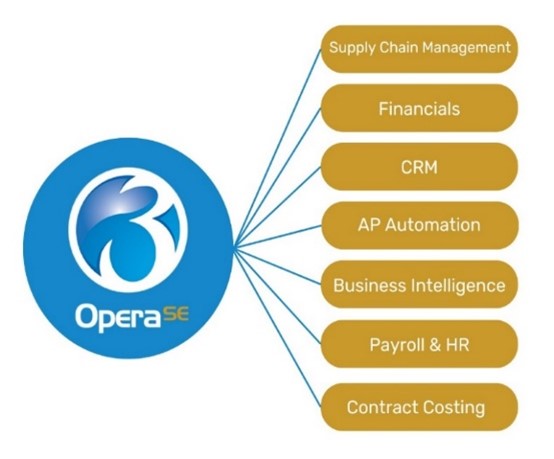
Pegasus Opera 3 SE software delivers the power and functionality to make managing your business simpler and dramatically more efficient. It has been developed to excel at everyday business needs and is built on powerful Microsoft technologies to enable full integration with other office tools as well as taking security to another level.
Whatever your industry, Opera 3 SE provides the tools to enhance the way everyone in your organisation works. Plus, if you have one of our Opera CD’s, you can take advantage of special introductory offers!
Contact us now on 08000 195101 or email us at Sales@profile.co.uk to find out more.
– The Profile Team

Security Update: Transition from Kaspersky to ESET Complete
Important Security Update: Transition from Kaspersky to ESET COMPLETE
Considering recent developments, we are reaching out to inform you about a critical update regarding your cybersecurity measures and security concerns regarding Kaspersky Anti-virus.
Security Concerns with Kaspersky Anti-Virus
According to a recent article by the Associated Press, the use of Kaspersky Anti-Virus has come under scrutiny due to potential security risks linked to its ties with Russia. Given the increasing cybersecurity threats and the need to protect your business data, it is essential to consider alternative solutions that ensure your data remains secure.
The article can be found here: https://apnews.com/article/cybercrime-kaspersky-ban-russia-6171421f4efe18f0c45528fbcb581ce9
Transition to ESET COMPLETE
- Comprehensive Protection: ESET COMPLETE offers advanced protection against a wide range of cyber threats, including ransomware and other malware.
- Enhanced Email Security: It includes advanced scanning and filtering for your Office 365 email, protecting you from phishing and malware attacks.
- Integrated Multi-Factor Authentication (MFA): ESET COMPLETE supports MFA for remote workers, adding an extra layer of security to prevent unauthorized access.
- Proactive Threat Prevention: With state-of-the-art threat detection and prevention mechanisms, ESET COMPLETE ensures your business is safeguarded from both known and emerging threats.
Special Offer for Our Valued Customers
To facilitate a smooth transition, we are offering a 25% discount on install costs on ESET COMPLETE for all customers currently using Kaspersky Anti-Virus. Our team will assist you every step of the way to ensure a seamless switch without any disruption to your operations.
Take Action Today
Please contact us at sales@profile.co.uk or call us on 08000 195101 to discuss your transition plan and take advantage of this special offer. Your data security is our top priority, and we are here to help you make the necessary changes to protect your business.
– The Profile Team
Profile’s Dazzling Summer Offers
Brighten your Summer with Profile’s Dazzling Offers!
The summer weather has finally arrived, and Profile has some dazzling offers to make your summer months even brighter. Take advantage of these amazing deals available to our valued customers:
Up to 50% off Training & Managed Services
- Up to 50% off remote training for Pegasus Software or Managed Services for your network.
10% off Opera 3 Sales Pipeline Manager
- Manage all your prospects, existing customers, and suppliers seamlessly.
- Quote using your part numbers and pricing, report on your pipeline, and convert quotes straight to orders in Opera 3.
- Email us at info@profile.co.uk to arrange a short demonstration of Opera 3 Sales Pipeline Manager and get a 10% discount on your purchase.
10% off exclusive Utilities for Opera & Operations
- Explore our range of Utilities designed to meet your business needs.
- Click here to discover what Utilities we offer and enjoy an extra 10% off with free AMC for the first year.
Contact us to make the most of these offers
Reach out to your Account Manager free on 08000 195101 or email us at sales@profile.co.uk, and we will be happy to help.
Don’t miss out on these fantastic opportunities!
– The Profile Team

Christmas Opening Hours 2023
Christmas Opening Hours 2023
Over the Christmas period you may need our Support services. Please see below our opening hours:
- Friday 22nd December 2023 – support lines open until 12:30pm
- Monday 25th December 2023 – BANK HOLIDAY – Closed
- Tuesday 26th December 2023 – BANK HOLIDAY – Closed
- Wednesday 27th December 2023 – Limited support available 9am – 5:30pm
- Thursday 28th December 2023 – Limited support available 9am – 5:30pm
- Friday 29th December 2023 – Limited support available 9am – 5:30pm
- Monday 1st January 2024 – BANK HOLIDAY – Closed
- Tuesday 2nd January 2024 – Open as normal
We will be available to call on the following numbers during 27th – 29th December:
- Pegasus Software Support: 0345 066 0099
- Hardware and Network Support: 0345 520 0099
You can also email support@profile.co.uk and we will get back to you as soon as possible.
– Merry Christmas from the Profile Team!
Autumn Special Offers
Profile Special Offers!
Profile have some exciting new offers for you, that we hope you can all take advantage of:-
Free of Charge Pegasus Clinics
We will be offering open clinics to all our customers on Friday 20th October & Friday 17th November where you can book a 30-minute slot with one of our Pegasus consultants, to ask them any questions relating to your Pegasus software which you may have.
Please click here to book your slot early to avoid disappointment.
Opera & XRL Training Discounts
Up to 50% off remote training for Opera 3 & XRL, valid until 30th November 2023.
Opera 3 Credit Manager Webinar
Profile will be running a short webinar for customers demonstrating the power of Pegasus Opera 3 Credit Manager on Thursday 26th October at 10.30am and are offering 10% discount when you purchase this product. Register for the webinar here.
10% off Profile Pegasus Utilities
Profile have several utilities which may help your business needs. Click here to find out what Utilities we offer and gain an extra 10% off with free AMC for the first year.
To make the most of our offers whilst they are available, please contact your Account Manager free on 08000 195101 or email us at sales@profile.co.uk and we will be happy to help.
– The Profile Team
AP Automation
Pegasus Accounts Payable Automation
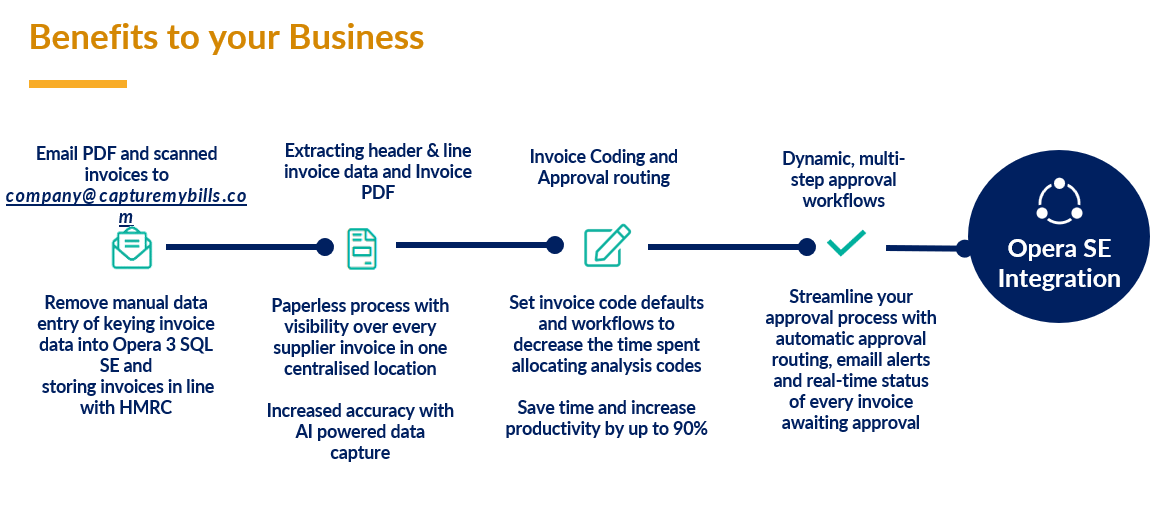
Automating your Accounts Payable function provides the simplest way of processing invoices and gives you complete visibility of your financial position to make smart budgeting decisions.
A unique email address is used to capture your invoices, which are then automatically converted into a digital format, including any attachments, invoice header and line details. The AP automation feature uses Optical Character Recognition (OCR) to extract all the relevant information from the invoices and Artificial Intelligence (AI) is used to recognise repeated patterns and improve accuracy.
Finance teams have complete visibility and control over the status of every invoice processed to allow for smarter budgeting decisions, and a duplicate invoice check ensures no invoices are paid twice. An automated bank account capture reduces the risk of fraud and the approval process can happen anytime, anywhere by the nominated approver/s.
Once approved the invoice will appear in Opera 3 SQL SE with a full audit trail and will be electronically stored for seven years to meet audit requirements.
AP Automation features include:
- Duplicate invoice check – stops you paying invoices more than once.
- Flexible capturing – capture invoices in many languages, currency or amount. PDF, doc/docx, xls/xlsx, htm/html, xt, tif/tiff, Jpeg plus many other file types accepted.
- Reporting – comprehensive reporting provides drilldown to specific suppliers and their invoices to highlight the status of each invoice.
- Audit requirements – invoices are electronically stored for 7 years to meet audit requirements.
- Simple coding – ledger coding is simple to automate by supplier, specific invoices and for each and every line of the invoice.
- Integration with Opera 3 SQL SE – invoices are automatically posted to the Purchase Ledger once approved.