

Blogs
Making Tax Digital Key Points
Making Tax Digital – Key Points
You should all by now be feeling ready to take on Making Tax Digital, but before you do it’s well worth reading our key points below. These will ensure that your first MTD submission goes smoothly and should answer any of your final questions! It is recommended that you read through these and save them for future reference.
- Ensure all VAT transactions are committed prior to the start date of the first MTD period. You will not be able to activate MTD if there are any uncommitted VAT transactions prior to the MTD start date. MTD cannot be switched on until you have committed, submitted and paid the final VAT return using the pre-MTD system.
- Run the VAT Tidy. Remember you will need to keep the last 6 years of transactions.
- Pilot Scheme if you have inadvertently signed up for the Pilot Scheme (which means your MTD start date is before 01/04/2019), please contact Support for instructions as to how to proceed.
- Once you have signed up for MTD with HMRC you can no longer submit any VAT Returns manually via the Government Gateway.
- Both Capital Gold and the Opera 3 Scheduler server are used to communicate with HMRC so will require internet access. Ensure that your default browser is not set to block all cookies at this will prevent the MTD Authorisation process from completing successfully.
- Opera 3 and Capital Gold require Microsoft.NET 4.7.2.
If you require any further assistance with setting up MTD or any clarification on any of the points mentioned above, please contact Systemcare Support on 08450 660099. If you would like to schedule some more in depth MTD training, then please contact your Account Manager, call 08000 195101 or email sales@profile.co.uk.
P11D update 2019
P11D 2019.2.1 Update now available to download
An update for P11D is now available to download and install! You can read the release communication with a list of changes and software fixes included in 2019.2.1 here. Please follow the instructions below to complete the update. if you require any assistance with this please contact Systemcare Support on 08450660099.
Turn on Live Updates
1) In the P11D software locate the “help” option in the top bar. in that menu find “About P11D Organiser” and then choose “Software Live Update”.
2) Press the OK button to check for updates
2) If you are on the latest version then the software will tell you. Press OK to continue.
3) If there is an update to be installed a prompt that reads “Do you want to download [p11d.exe] – [2019.2.1 Build No 001]” should pop up. Click yes to apply the update.
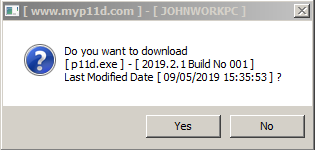
If Live Updates is already turned on
When you open the P11D software then the prompt “Do you want to download [p11d.exe] – [2019.2.1 Build No 001]” will pop up automatically. Click yes to apply the update as usual.
When the update is complete you will see the below message. Press OK to continue using the software!
If you need any assistance with this P11D update, please contact our Systemcare Support team on 08450 660099 or email support@profile.co.uk
Priority V. 19.0 – available now
Priority V. 19.0 – Available Now!
The latest version of Priority is now available. Priority V. 19.0 offers a range of new features, including significant UI enhancements inspired by customer requests, as well as some other intuitive changes. The update also adds support for multiple apps and organisations for the Mobile App Generator. Mobile Apps are now fully supported by tablets as well as other mobile devices.
To discover Priority Software and its features in more detail, visit our Priority Homepage or contact your account manager on 01442 236311. You can also email sales@profile.co.uk with any enquiries.
Support test page
 Profile Support (test)
You can use this page to log a support query. A member of the Systemcare Support Team will get in contact with you as soon as they are free.

Priority – Mobile Apps
Download the Priority Mobile Solutions Brochure
Priority – Mobile Apps
ERP doesn’t need to be tied to a desktop. Priority is a modern solution that offers a variety of mobile ERP solutions. These mobile apps allow your employees who spend time in the field to access Priority functions and information wherever they are. On top of the ready-to-use apps included in Priority, the functionality to generate your own mobile app that fits your businesses own needs and workflow is included.
>>>See it in action Watch how simple it is to create your own custom mobile app.
[widgetkit id=227]
Priority – Business Intelligence
Priority – Business Intelligence
Priority’s business analytics tools are built as an integrated part of the application. Users can quickly and easily drill-down with a single click from aggregated data presented in dashboards and dynamic BI reports directly to the underlying data elements in their respective Priority forms. Users have the freedom to independently tailor reports and dashboards, add and personalize shortcuts and business metrics, and easily compare and contrast data of all types, including financial, sales and marketing, customer support and more.
[widgetkit id=223]
Priority – Customer Service
Priority – Customer Service
Priority‘s customer service and support module is fully integrated with all other Priority functions to deliver a holistic view of the customer.
[widgetkit id=217]
Priority – Project Management
Priority – Project Management
Keep track of customer projects and facilitate team collaboration by linking every task to its related project. Coupled with email integration that synchronises all relevant details.
[widgetkit id=215]
Priority – Production
Priority – Production
Download the Priority Manufacturing brochure
The production module in Priority allows you to manage to end-to-end production process and also allows a complete work cycle with subcontractors.
[widgetkit id=206]

Watch: Pegasus overview video of Making Tax Digital operation in Opera 3
Watch: Pegasus overview video of Making Tax Digital operation in Opera 3
A new in-depth video has been released about how to do MTD submissions in Opera 3! This 30 minute video is well worth watching as it covers:
- Signing up for MTD with HMRC
- Authorising Opera 3 to communicate with your VAT account
- Amending the figures on a VAT return
- Importing a VAT return from a third party product
- Consolidating the VAT returns
- Submitting the VAT returns to HMRC.
The video also includes the new advanced Making Tax Digital functionality for those who need to import data for group submissions. A worthwhile watch for everybody who will be submitting VAT in Opera 3!
Priority – Supply Chain
Priority – Supply Chain
Download the Priority Warehouse Management System brochure
The purchasing module enables you to manage vendors, price lists and purchase orders and plan for material requirements.
[widgetkit id=202]