Hints & Tips

Copy Opera Grid Forms to Excel

Hints & Tips for Opera 3 

Welcome to our next Hints & Tips for Opera 3 to help you get the most from your software. We really hope you find this email both beneficial and helpful.
Please share with all your Opera users.

did you know

Copy Opera Grid Forms to Excel

…. when sat viewing any grid form, which could be an Accounts list or a list of Transactions, as below…

account grid

…simply Right mouse click one of the column headings, which will display a menu and select Copy Data.

copy data

Then, Open Excel, Ctrl+V to paste the grid’s contents and… voila!

excel copy data

Watch out for our next in the series.

– The Profile Team

Read now

Send Copy Sales Invoice & Autofill Current Year

Hints & Tips for Opera 3 

Welcome to the first of many Hints & Tips for Opera 3 to help enhance you and your colleagues’ efficiency while using the software. We really hope you find this email both beneficial and helpful. Please feel free to share it with your relevant team members.

didyouknow

1. You can send a copy sales invoice with one simple click…

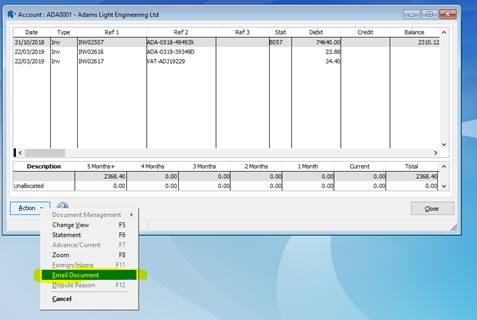
Go to the customer’s account view, highlight the desired invoice then right click, or select Action, and email document.

sl account
sl email document
hints and tips

2. Opera autofill’s the current year for you…….

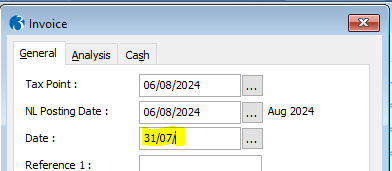
In a date field, enter the day and month as normal, but leave the year blank, as follows:

sl invoice date

Then use the Tab [key] or click in the next field and the current year 2024 will be auto populated for you.

sl invoice date autofill

We hope this helps. Look out for more useful hints and tips coming soon.

– The Profile Team

Read now

Hints & Tips for Opera 3

profile logo 2

Hints & Tips for Opera 3

Welcome to the first of many Hints & Tips for Opera 3 to help enhance you and your colleagues’ efficiency while using the software. We really hope you find this email both beneficial and helpful. Please feel free to share it with your relevant team members.

did you know

  1. You can send a copy sales invoice with one simple click…

  Go to the customer’s account view, highlight the desired invoice then right click, or select Action, and email document.
SL Account
SL email document
Hints and Tips
2. Opera autofill’s the current year for you…….
In a date field, enter the day and month as normal, but leave the year blank, as follows:
SL Invoice date
Then use the Tab [key] or click in the next field and the current year 2024 will be auto populated for you.
SL invoice date autofill
We hope this helps. Look out for more useful hints and tips coming soon.
– The Profile Team
Read now
Scroll to Top