With Average Debtors Day calculation per customer, Opera 3 helps you manage aged debt, for a realistic revenue forecast.
Financials are the core to any business, whatever its size. With Opera 3 you can continually track your revenue and when it is due. Equally important, it reminds you who you owe money to and when it has to be paid. You’ll find the visibility of your cash flow invaluable for your profit generation. What’s more, reports from the Financials can be output directly to MS Excel.
Once we know your business aims and budget allowances we will provide Opera 3 as one system and one solution for your company. If you would like further information on Opera 3, please download the brochure from the More Information box on the left, check if there are any webinars currently running or if not please request a webinar, or contact us.
The Sales Ledger has built-in credit control facilities so that customer account information is all at your fingertips. And it makes revenue forecasting easy with the automatic calculation of average debtor days for both individual customers and your entire company.
You can e-mail statements, copy invoices and debtors letters. You can view your sales information in a way that is meaningful to you, as Opera 3 offers Views that you can customise. And of course, it caters for multi-currency and handles all your customer profiles and trading terms, as well as invoices, credit notes, receipts, refunds and adjustments.
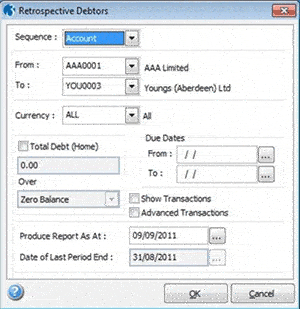
The Retrospective Debtors report in the Sales Ledger produces a list of outstanding customer debts as at a date specified, aged according to the length of time the debt has been outstanding. For example, to rerun your Debtors report at 31 December 2010, you simply enter that date and the report calculates the debtors position at that time. The report can be printed and output to Excel.
With Opera 3, all your supplier transactions are thoroughly and securely managed from start to finish. Your cash flow is automated and improved with a comprehensive cheque and BACS payment routines, e-mail remittances (individual or batched), and the calculation of creditor days.
It gives you dynamic access to purchase information across multiple periods and you can view the information you need in the manner you choose.
The integrated Purchase Invoice Register allows invoices and credit notes to be posted and remain in the register until they are authorised, giving you greater control over every document received. Payment workflow is enhanced though BACS and cheque payment routines combined with e-mail remittance. What’s more, with back-to-back processing to the Fixed Assets application, you can create an Asset record when posting an invoice to save re-keying information.
The Retrospective Creditors report in the Purchase Ledger produces a list of outstanding supplier debts as at a date specified, aged according to the length of time the debt has been outstanding. The report can be printed and output to Excel.
Nominal Ledger
Nominal Ledger includes analysis of Account, Type, Sub-type, Cost Centre plus two further user-definable levels as standard, giving you access and in-depth analysis at transaction level for the past 9 years.
Get management information and reports from Financials, Supply Chain and Payroll & HR. You can apply budgets at all four analysis levels, for current or future periods and years, with full percentage variance analysis and reporting. You can even easily change your year start date and maintain your data integrity.
The Nominal Ledger offers the Open Period Accounting functionality. Transactions can easily be posted from other applications such as Sales, Purchase, Cashbook, and Payroll into any open period of the last, current or next 3 financial years. Other applications post to the Nominal Ledger by either batch update or real-time transfer. Even mis-posted nominal journal entries can be reversed and rectified quickly and accurately.
Cashbook
With Cashbook you can post transactions directly from Financials, while the reconciliation function allows you to post unexpected entries, interrogate transactions and save incomplete reconciliations so you can finish them later.
” Cashbook for us has been a real game changer; it saves us an enormous amount of money and also means that we as a business can manage our risk ” Guy Atkins, Managing Director, Jo Bird
Costing
With Opera 3 Costing you can track job costs and revenues against budgets, and you can break down costs against a variety of categories including Labour, Contractor, Direct Expense, Stock and Interim Billing. Group jobs under contract headings or post against option phase, and stay easily in control. Any Timesheets raised for work on jobs can easily be transferred into Payroll to update employee records.
Multi Currency
Opera 3 handles unlimited currencies, exchange rates per transaction type and the calculation and recording of exchange rate fluctuations.
“As Ibonhart trades internationally, multi currency within Opera 3 is quite an important function for us as it allows us to reconcile on a daily basis with the up-do-date exchange rates” Sheila Austin, Accounts and Payroll Manager
EC VAT
If you trade within the European Union there are complex VAT rules you have to comply with regarding the importing and exporting of goods. These rules can be hard to follow and failure to comply can result in financial penalties. To help you, these complex rules are automatically built into Opera 3 EC VAT to make it easier for you to trade in Europe.
You can define and maintain the information to produce the EC Sales List (ESL) and Supplementary Declarations (SD), including country codes, modes of transport, terms of delivery, commodity codes and nature of transaction codes for Intrastat purposes. The EC Sales List can also generate an XML upload file for submission via the HMRC website.
If you are using foreign currency accounts, appropriate VAT rate codes for EC sales and purchases can also be set up. This application will then collect the information needed to produce the returns for trading with EU member countries.
Fixed Assets
Keep track of your assets from the minute they become part of your company right until you dispose of them. Opera 3 Fixed Assets will track their depreciation rates and maintain the correct net book value for them throughout their life cycle. It caters for all types of assets, including Finance or Operating Lease and Hire Purchase or Lease Purchase assets. What’s more, the import routine makes it simple to import existing asset lists from a spreadsheet in bulk.
Features
Nominal Ledger
Flexible Chart of Accounts
Account, Type, Sub Type, Cost Centre, Department and Project
Financial Calendar
Define up to 24 periods
Rebuild Periods
Allows period balances to be re-calculated if the Financial Calendar is adjusted during the fiscal year
Dimensional Analysis
Cost Centre, Department* and Project* analysis
Group Analysis
Group together Nominal accounts for additional reporting and analysis
Journals
Reversing, Recurring, Retained (Skeleton) and VAT journals
Open Period Accounting
Transactions can be easily posted from other applications such as Sales, Purchase, Cashbook, and Payroll into any open period of the current or next 3 financial years. Nominal Journals can be raised to the previous year.
Budgeting
Budgeting at Account, Cost Centre, Department and Project level with import facilities from Microsoft Excel using Pegasus XRL
Private Nominal Accounts
Account details can be restricted to users who have had additional security applied
Real-time or Batch Update
Update Nominal accounts in real time or batch update from source ledgers
Distribution Accounts
Transactions posted to distribution accounts are automatically distributed to cost centres based on defined percentages
Multi-Currency
Nominal accounts can hold both base and currency period to date, year to date and previous year values
Revaluation
Currency bank balances can be re-valued at any time based on current exchange rates
Transaction History
Retain transactions and journal images for up to nine years
User Definable Views*
Define financial management Views with up to six levels of analysis, apply criteria filtering and graphical representation. Report across fiscal years and periods with transactional drilldown and easy export facilities to Microsoft Excel
Transactional Drilldown
Drilldown through user definable Views or Nominal accounts to period values, transactions and source documents
Financial Reporting
An extensive range of reports are provided as standard including the ability to define your own management reports (Profit & Loss and Balance Sheet)
Consolidation
Multi-company account consolidation providing group reporting facilities with the ability to consolidate ledgers with different operating currencies
Excel Integration
Information can easily be extracted from Opera 3 into Microsoft Excel with Pegasus XRL
Customisable
The Nominal Ledger can be customised to suit the specific requirements of your business
Context sensitive Help
Comprehensive and easy to use Help facilities
Cashbook
Receipts and Payments
Can be processed in the Cashbook, Sales or Purchase Ledgers
Batch Processing
Batches of Receipts or Payments can be posted together in a single transaction
Cashbook Types
Allows the creation of multiple Cashbook types for Receipts, Payments and Transfers to match how transactions will appear on bank statements
Recurring Entries
Set-up direct debit and standing order entries on a monthly, quarterly or user definable basis
Bank Reconciliation
Includes transactional drilldown, ledger postings, the ability to save a partially completed bank reconciliation and the ability to produce the bank reconciliation listing as per the bank statement
Bank Transfers
Transfer funds from one account to another
BACS and e-Banking
Allows payments to be processed via BACS and banking software
Multi-Currency
Create home and currency bank accounts
Petty Cash
Create any number of Petty Cash accounts
Cheque & Remittance Advice
Allows combined cheque and remittance advice production, to suit your company stationery
Matching
Easily match and remove any incorrectly posted transactions which will never appear on the Bank Statement
Opening Balances
Individual account set-up is simplified with the Opening Balances routine
Transaction History
Reconciled transactions can be retained for up to 99 periods
Comprehensive Reporting
An extensive range of reports are provided as standard
Account View
Provides reconciled and un-reconciled information, statement number and date range selection, transaction detail, statement line number and paying in slip reference
Excel Integration
Information can easily be extracted from Opera 3 into Microsoft Excel with Pegasus XRL
Customisable
The Cashbook can be customised to suit the specific requirements of your business
Context Sensitive Help
Comprehensive and easy to use Help facilities
Sales Ledger
Trade in Multiple Currencies
Process transactions in any currency, with values recorded in the base and customers operating currency
Delivery and Head Office
Unlimited delivery accounts with the ability to re-direct invoices and statements to Head Office
Trading Terms
Define trading terms for an individual or a range of customers (eg payment terms, settlement discount and credit limit)
Credit Control
Includes statement production, debtor letters, provision for bad debts, customer debtor days, statistical debtor analysis, customer notes and the ability to place customer accounts on stop
E-mail Integration
Produce customer e-mails, statements and copy invoices, automatically generating a customer note for audit and reporting purposes
Multiple Contacts
Unlimited contacts and the ability to apply up to six attributes against each contact, ideal for marketing campaigns and targeted mailings
Disputed Invoice Analysis
Assign user definable reason codes against disputed invoices, with reporting facilities to highlight any trends and automatic customer note generation
Statistical Debtor Analysis
Includes average debtor days, turnover and Sales analysis for up to 99 periods
Customer Notes
Assign notes to customer records as a reminder or a task for others, with full e-mail integration
Dormant Accounts
Exclude any dormant accounts from Sales processing, searches and reports
Transaction History
Retain transactions for up to 99 periods
Attachments
Attach multiple files (eg spreadsheet, Word document) to a customer account
User Definable Views
Define Sales Views with up to six levels of analysis, apply criteria filtering and graphical representation. Report across Sales periods with full transactional drilldown and easy export facilities to Microsoft Excel or Word
Transactional Drilldown
Drilldown through user definable Views or sales accounts to transactions and source documents
Comprehensive Reporting
An extensive range of reports are provided as standard
Excel Integration
Information can easily be extracted from Opera 3 into Microsoft Excel with Pegasus XRL
Customisable
The Sales Ledger can be customised to suit the specific requirements of your business
Context Sensitive Help
Comprehensive and easy to use Help facilities
Purchase Ledger
Trade in Multiple Currencies
Process transactions in any currency with values recorded in both the base and suppliers operating currency
Ledger Account
Specify an alternative ledger account to receive payments for this supplier eg a factoring house
Trading Terms
Define individual terms or profiles to attach to supplier accounts, including settlement discount rates and supplier payment terms
Suggested and Automatic Payments
Methodical payment routines that allow the progression of payments for suppliers from suggested payments to authorisation and through to generation of cheque and BACS payments
Cheque & Remittance Advice
Flexible design allows the generation of a combined or individual cheque and remittance advice, to suit your company stationery
E-mail Integration
Send an email directly from the supplier account using contact information. This will automatically generate a supplier note for audit and reporting purposes
Purchase Invoice Register (PIR)
Use PIR to record Purchase Invoices and Credit Notes. Once authorised the transactions can then be posted to the Purchase Ledger to update the accounts and the Purchase analysis files
Held Invoice Analysis
Assign user definable reason codes against disputed Invoices, with reporting facilities to highlight any trends and automatic supplier note generation
Multiple Contacts
Unlimited contacts and the ability to apply up to six attributes against each contact
Dormant Accounts
Exclude any dormant accounts from Purchase processing, searches and reports
Attachments
Attach multiple files (eg spreadsheet, Word document) to a supplier account
Transaction History
Retain transactions for up to 99 periods
User Definable Views
Define Purchase Views with up to six levels of analysis, apply criteria filtering and graphical representation. Report across periods with full transactional drilldown and easy export facilities to Microsoft Excel or Word
Transactional Drilldown
Drilldown through user definable Views or Purchase accounts to transactions and analysis
Comprehensive Reporting
An extensive range of reports are provided as standard
Excel Integration
Information can easily be extracted from Opera 3 into Microsoft Excel with Pegasus XRL
Customisable
The Purchase Ledger can be customised to suit the specific requirements of your business
Context Sensitive Help
Comprehensive and easy to use Help facilities
Costing
Contracts, Jobs and Phases
This flexible structure provides extensive control, monitoring and reporting of Contracts, Jobs and Phases
Estimates
Full Estimate processing with budget forecast and Quote production facility. A Job can be created from an Estimate without the need to re-key the information and an Estimate can be used more than once
Cost Types
Use an extensive range of Cost and Revenue cost types including: Direct and Recharge Expense, Labour, Contractor, Stock, Retention, Interim & Final Billing, Overhead and Retention
Cost Code Analysis
Create unlimited Cost Codes, linked to Cost Types, to give unlimited analysis of cost and revenue transactions, overheads and budget comparison
Cost Rates
Allows up to 999 Cost Rates to be used at Contract or Job level. If a change of rate is required this can be applied at transaction level, applying the appropriate cost from the Cost Code
Budgets
Actual and revised budgeting facilities
Revenue
Revenue postings created in Costing can generate detailed Documents in Invoicing or SOP. Choose to Invoice by individual Cost lines, Frameworks, Cost Types or a direct value
Integration
Real-time integration with Opera 3 Financials, Supply Chain Management and Payroll & HR means transactions are only required to be processed once
Batch Processing
Use Batch Processing to enter batches of Timesheets or Costs for a range of Jobs in one efficient process
Payroll Transfer
Employee Timesheets processed in Costing can easily be transferred to Payroll, saving the need to re-enter the information
Frameworks
Group associated Cost Codes and apply to Jobs and Estimates to simplify the budget process
Department Analysis
Add further analysis by introducing an optional Department code against Jobs and Estimates
Transactional Drilldown
Detailed, multi-level transactional drilldown at Contract and Job level
User Definable Views
Define Costing Views with up to six levels of analysis, apply criteria filtering and graphical representation. Report across periods with full transactional drilldown and easy export facilities to Microsoft Excel
Global Cost Codes
Provides the ability to perform a global update of Cost Codes, including the option to increase any overhead values
Comprehensive Reporting
An extensive range of reports are provided as standard
Excel integration
Information can easily be extracted from Opera 3 into Microsoft Excel with Pegasus XRL
Customisable
Costing can be customised to suit the specific requirements of your business